TOUR A PAYMENT PAGE IN 60 SECONDS

TAKE A TOUR

epaypolicy integrates with

MGA Systems' IMS

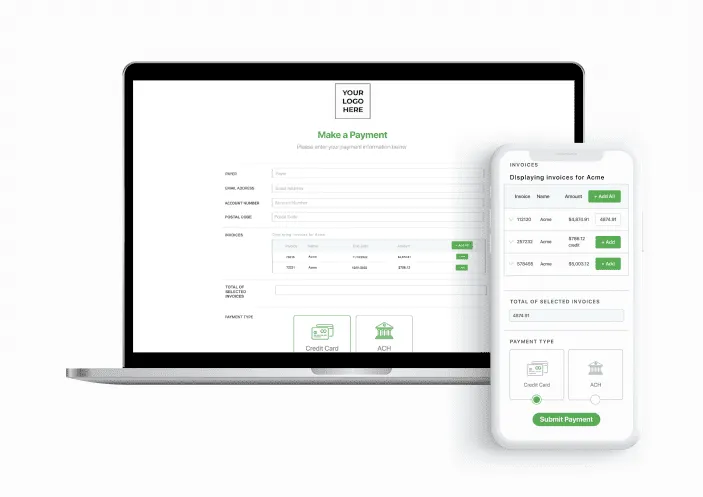
Start with our customizable payment page, branded to your business.

Schedule Demo

BRANDED PAYMENT PAGE

LIVE CUSTOMER SUPPORT

PCI LEVEL 1 SECURITY

COMPLIANT IN ALL 50 STATES

Why integrate with MGA Systems' IMS?

With the MGA Systems’ IMS integration, ePayPolicy provides a simple, seamless way to collect payments electronically via credit card or ACH.

Once activated, ePayPolicy automatically reconciles electronic payments into MGA Systems’ IMS.

Get Started

Real-time invoicing

Let your insureds review and select which invoices they would like to pay directly from your client portal.

Invoice notification

Automate your invoice notification process by sending email reminders through ePay for due and past due invoices.

Learn More

Auto-Pay

Allow your client to set up a payment method that will automatically pay invoices when due.

Learn More

Custom Features

Customize your payment page with your company’s logo and colors. Add custom fields and disclaimers for extra personalization.

Automate Check Payments with Checkmate

MGA Systems-integrated customers can use CheckMate to make taking checks as easy as online payments, with daily check collection and batched deposits from a secure lockbox. Match and reconcile check payments with open invoices from your accounting systems.

  • Eliminate double work and manual data entry
  • Smart scanning to sort and recognize open invoices
  • Payment details written back to your management system
Learn More

QUESTIONS & ANSWERS

Frequently Asked Questions

Here are some of our most-asked questions
We’ll add at least two unique identifier fields such as an account number and zip code. Once that information is entered on the payment page the invoices associated with that account will be accessible.
Once the questionnaire has been received our support team will be able to activate your integration within 1 – 2 business days.
To set up an integration you will need to switch from your Essentials Plan subscription to an Integrated Plan subscription.
Yes – showing credits is an option that we can turn on or off. If credits are shown, they will have to be taken against invoices that have a balance. Our system requires the total amount to be greater than zero for a payment to go through.
We can enable the “Not Invoiced” option where an insured can make an arbitrary payment for a quote.
Invoice Notifications are off by default for all accounts. To turn them on or back off, contact your account manager or our support team.
Please contact your Account Manager or our support team for assistance with this.

ePayPolicy Enterprise MGAs Features

Current ePayPolicy User?

Activate Integrations

FAST, GUIDED ONBOARDING

3 Step Activation Process

01

Sign Up for ePayPolicy

Create your account and customize your branded payment page in minutes.

02

Complete Integration Form

Submit our quick integration form; our support team configures your sync in 1–2 business days.

03Live!

Collect Digital Payments

Accept card and ACH payments while invoices, receipts, and suspenses reconcile automatically.

✓No start up costs✓No contract✓No hidden fees
Sign Up Now

Our Partners

Driving technology across the insurance industry